Keyboard Shortcuts
Master these shortcuts to fly through your Git workflow.
There are many settings to explore: 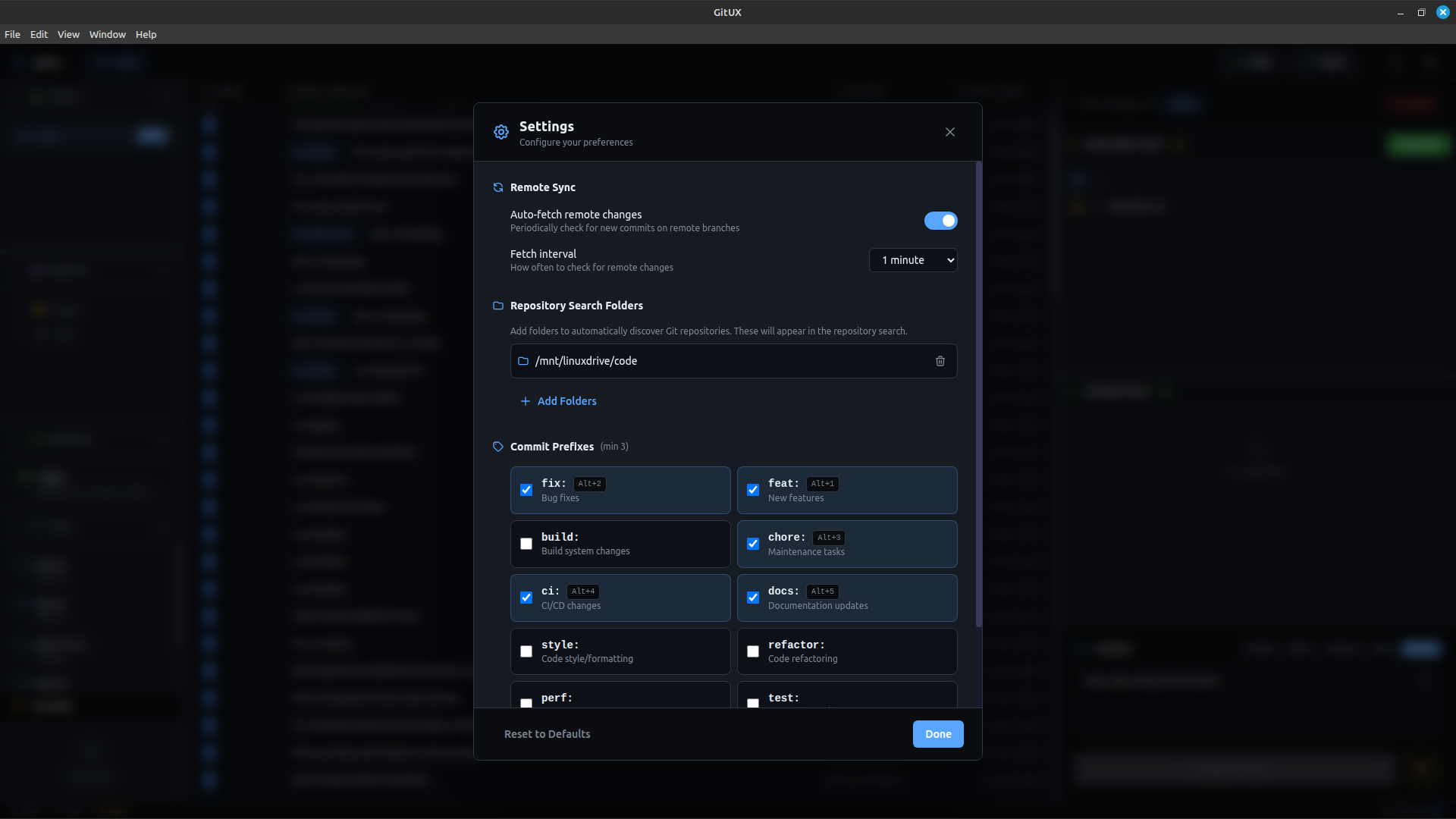
Viewing All Shortcuts
Press Ctrl+/ at any time to open the keyboard shortcuts panel within Gitux.
File Operations
| Shortcut | Action |
|---|---|
Ctrl+O | Open repository |
Alt+O | Open recent repositories modal |
Ctrl+R | Refresh repository |
Git Operations
| Shortcut | Action |
|---|---|
Ctrl+P | Push to remote |
Ctrl+Shift+P | Pull from remote |
Ctrl+S | Stage all unstaged files |
Ctrl+Enter | Commit (when in commit message) |
Alt+M | Toggle voice input (microphone) |
Commit Prefixes
Quickly add conventional commit prefixes:
| Shortcut | Prefix | Use For |
|---|---|---|
Alt+1 | feat: | New features |
Alt+2 | fix: | Bug fixes |
Alt+3 | enh: | Enhancements |
Alt+4 | docs: | Documentation |
Press the shortcut to add the prefix. Press again to remove it.
Navigation
| Shortcut | Action |
|---|---|
Ctrl+F | Toggle search & filter panel |
Alt+C | Focus commit message textarea |
Escape | Close modal / diff viewer / details panel |
Menu Access
| Shortcut | Action |
|---|---|
Alt+F | Open File menu |
Alt+V | Open View menu |
Alt+W | Open Window menu |
Alt+H | Open Help menu |
View Controls
| Shortcut | Action |
|---|---|
Ctrl+Shift+I | Toggle Developer Tools |
Ctrl++ | Zoom in |
Ctrl+- | Zoom out |
Ctrl+0 | Reset zoom |
F11 | Toggle fullscreen |
Help
| Shortcut | Action |
|---|---|
Ctrl+/ | Show keyboard shortcuts panel |
Workflow Examples
Quick Commit Flow
Ctrl+S      → Stage all files
Alt+1       → Add feat: prefix
Alt+C       → Focus message input
[type msg]  → Write your message
Ctrl+Enter  → Commit
Ctrl+P      → Push to remote
Voice Commit Flow
Ctrl+S      → Stage all files
Alt+2       → Add fix: prefix
Alt+M       → Start voice recording
[speak]     → Dictate your message
Alt+M       → Stop recording
Ctrl+Enter  → Commit
Repository Switching
Alt+O       → Open recent repos modal
[click]     → Select repository
            → Instantly switch
Customization
Currently, keyboard shortcuts are not customizable. We're considering adding this feature in a future update.
Platform Differences
macOS
Replace Ctrl with Cmd for most shortcuts:
Cmd+O— Open repositoryCmd+P— PushCmd+S— Stage all
Alt shortcuts remain the same on all platforms.
Linux
All shortcuts work as documented. Some desktop environments may intercept certain key combinations.
Tips for Learning Shortcuts
- Start with the essentials:
Ctrl+S,Ctrl+Enter,Ctrl+P - Add prefixes:
Alt+1throughAlt+4 - Master navigation:
Alt+O,Alt+C,Escape - Use the cheat sheet:
Ctrl+/when you forget
Printable Cheat Sheet
┌─────────────────────────────────────────────┐
│           Gitux Keyboard Shortcuts         │
├─────────────────────────────────────────────┤
│ FILES                                       │
│   Ctrl+O      Open repository               │
│   Alt+O       Recent repositories           │
│   Ctrl+R      Refresh                       │
├─────────────────────────────────────────────┤
│ GIT                                         │
│   Ctrl+S      Stage all                     │
│   Ctrl+Enter  Commit                        │
│   Ctrl+P      Push                          │
│   Ctrl+Shift+P Pull                         │
├─────────────────────────────────────────────┤
│ PREFIXES                                    │
│   Alt+1       feat:                         │
│   Alt+2       fix:                          │
│   Alt+3       enh:                          │
│   Alt+4       docs:                         │
├─────────────────────────────────────────────┤
│ OTHER                                       │
│   Ctrl+F      Search & filter               │
│   Alt+C       Focus commit message          │
│   Alt+M       Voice input                   │
│   Escape      Close panel/modal             │
│   Ctrl+/      Show shortcuts                │
└─────────────────────────────────────────────┘
Next Steps
- Voice Commands — Use voice for commit messages
- Stashing Changes — Save work temporarily